What happens if Cover misses something?
You redact it in one click. The editor opens after every run so you can check each page. If Cover missed a word, mouse over it and click it.
To cover a whole passage, select it by dragging across the text.
Cover redacts handwritten and drawn signatures that sit by a signature line or label, ink and all. On a scanned page, or with no label nearby, cover it the same way you cover a photo, and the ink underneath comes out with it.
Try it yourself
Can a redaction be undone?
If you have the original PDF, yes. Open it in Cover, change what's covered, and save a fresh copy.
If you don't, no. Saved redactions are permanent. The characters are removed from the file, so there's nothing underneath to recover.
Remove a redaction
Mouse over a redaction and click it to remove it. To place a redaction, mouse over the word and click it.
Remove many at once
Hold ⌥ Option and drag across them.
Try it yourself
What's the fastest way to proof your redactions?
Use the Terms list in the right sidebar. It shows everything Cover redacted, one line per term, with how many times it appears. Uncheck a line to un-redact it everywhere. Check it to put it back. It's the fastest way to spot an over-redaction and clean it up.
How do I redact a name everywhere it appears?
Use the magic redaction tool. Click a name once, and Cover finds every other place it appears, then asks if you want to redact them all. Click Redact all. No hunting through the document for each one.
How do I keep a redacted PDF readable for Ai?
Turn on Tokens before you give a redacted PDF to an Ai to ask it questions. It's the [ ] button beside the redaction button in the editor's toolbar.
A plain redaction tells an Ai nothing about what was there. With Tokens, each redaction carries a label instead, like NAME_1 or ACCT_1, so the Ai can still tell a name from an account number without seeing either.
Say it's a joint bank statement for two people, each with their own account. With plain redactions, an Ai can't tell whose account is whose. With Tokens it sees NAME_1 beside ACCT_1 and NAME_2 beside ACCT_2, and each person keeps the same label on every page. Now it can answer “whose balance went up?” You know who NAME_2 is. The Ai never does.
What kinds of information (PII) does Cover find?
- People: names, signatures by a signature line or label, phone numbers (toll-free numbers stay readable), email addresses, home and mailing addresses in the US and abroad (even when they're split across form boxes), and dates of birth when they're labeled, everywhere that date repeats.
- Government IDs: Social Security numbers (even pre-masked ones) and SSA claim numbers, ITIN and EIN tax IDs, labeled driver's license, passport and visa numbers, immigration numbers (A-Number, USCIS receipt, I-94), and national IDs from outside the US: UK National Insurance, Canada SIN, France NIR, Germany tax ID, Ireland PPSN, Netherlands BSN, India PAN, Italy Codice Fiscale, Mexico RFC & CURP.
- Money & accounts: bank account and routing numbers (including international IBANs and the numbers printed on checks), and labeled credit and debit card numbers.
- Labeled numbers: insurance and medical IDs (policy, member, Medicare, medical-record, provider NPI), plus invoice, loan, employee, student, claim, case and docket numbers, prescription numbers, W-2 control numbers, preparer PTINs, attorney bar numbers, and crash report and citation numbers.
- Vehicles: VINs and license plates.
Amounts and dates stay readable, and so do a business's name, address and toll-free numbers, so Ai can still make sense of the document.
You always get the final say. Every match shows up in the editor to confirm, and anything it didn't catch is one click to redact.
What about scans or photos of documents?
Yes. Scanned pages are redacted automatically. Photos take one manual step.
Scans
In the Mac app, Cover reads the text in a scanned page with OCR, then redacts what it finds, like any other PDF.
Photos
Cover doesn't wrap a redaction around an image the way it does around text, so cover one yourself:
- Click any white space to place a redaction.
- Hold ⌘ Command and drag it over the photo.
- Pull a corner until the photo is covered.
Try it yourself
How does Cover compare to Ai redaction?
Cover was built on trust. Trust needs transparency. A wave of new privacy tools is arriving. Many are just a new interface on top of an Ai model that runs offline. We wanted to know how Cover's own engine holds up against those models on real-world documents with the most private information.
So we built the bake-off, a head-to-head test. Cover and the leading private Ai engines redact the same bank, tax and medical PDFs. Then every result is checked against one answer key. It marks every private detail on every page.
Why we publish it
Plenty of tools say they keep your documents private. Few show their work. We publish every redacted page next to its original. Cover's mistakes are included.
What it's finding so far
For now, Cover's engine leads in four ways.
- The Ai engines over-redact. Each one redacts at least ten times as much clean text as Cover. That leaves a mess you can't clean up.
- They leak more private info. Every one left more private details unredacted than Cover did.
- Most are slow. Cover takes a few seconds per PDF. Most of the Ai models take from twenty seconds to several minutes.
- No quick fixes. None of them offers a fast way to fix a mistake. Cover has an intuitive editor. One click on a redaction you don't want removes it.
Compare the actual redacted pages from Cover and the leading local Ai engines, side by side.
Is there a guided tour?
Two, and both play inside Cover on sample documents.
Interactive tour
Practice on a sample lease: add and remove single redactions and whole groups, and redact an image.
Start the interactive tourPro Tour: Tax Return
Watch Cover work through a full tax return. Along the way you'll learn:
- The fastest way to proof a redacted document
- X-ray vision: see what's under every redaction at once
- How to redact a name everywhere in one click
- How to give each redaction a custom label, useful for court filings and legal review
- How to save a signed certificate with your file
Both are also in Cover's Help menu, and on this site under Tour.
Can Claude use Cover to redact my PDF without seeing my private info?
Yes. Claude can ask Cover to do the redacting. Claude then gets only the redacted copy. Set it up once, in three steps:
- In Cover, open Settings ▸ Ai Assistants (open it for me) and click Add to Claude Desktop. Claude Desktop opens and asks you to install it.
- In Claude Desktop, open Settings ▸ Connectors ▸ Cover. Turn it on, and add the folder your PDFs are in. Cover can only open PDFs inside the folders listed there.
- Ask Claude to redact a PDF by name.
Never drag an unredacted PDF into Claude’s chat. The moment a document is attached to a chat, Claude reads all of its text, private details included, before Cover gets a chance to redact anything. Instead, reference the PDF by its file name in the chat, like “redact my 1099.pdf,” and Cover handles the rest: it finds the file in your allowed folders, redacts it on your Mac, and hands Claude only the safe copy.
Want eyes on it first? Ask Claude to redact with a review, and the result opens in Cover's editor for you to confirm before Claude gets it.
Can I turn off the animations?
Yes. Turn off Show animations in Settings ▸ General. Everything works the same; Cover just skips the motion.
Open Settings ▸ GeneralHow do I update Cover?
Cover checks for updates on its own, downloads them in the background, and installs them the next time you quit Cover.
Open Settings ▸ UpdatesTo check right away, click Check Now…. If you'd rather be asked before an update installs, turn off Download and install updates automatically.
If you got Cover from the Mac App Store, it updates through the App Store instead.
What changed in the latest version?
Every version of Cover and what it changed is in the version history.
See the version historyWhat actually happens to the personal info inside my document?
It's removed. The sensitive characters come out of the document and the empty space gets filled with solid ink. We also clean hidden material a lot of people don't know is in there: form-field entries, document properties, edit history.
Two copies of the same line, Payee: Epstein estate, are each covered by a black redaction. Both redactions peel back from the corner and then come off. On the left, a box drawn in a PDF editor: the words are still there underneath, and the verdict reads Failed redaction. On the right, a Cover redaction: there is nothing underneath, and the verdict reads Real redaction.
This matters because some redaction tools just draw a black rectangle on top of the original text. If you copy-paste from one of those PDFs, the redacted text comes back. With Cover, there's nothing underneath to recover.
Does Cover remove hidden data and file metadata?
Yes. When it saves, Cover rewrites the whole file and clears what's hidden inside it:
- Document properties like author, title and creation date
- Earlier versions of the file and its edit history
- Form-field entries, flattened into the page
- Attachments, bookmarks and scripts
- Digital signatures
Photos you redact (PNG, JPEG, HEIC) are saved fresh, with no camera or location data.
Cover adds one thing: a record of where each redaction sits, so the editor can open the file again later. It never includes the redacted text. Before the file is written, Cover re-reads it and refuses to save if any redacted text is still anywhere inside.
Is this really all local?
The redaction is, yes. Turn off Wi-Fi and redact a file: everything runs on your Mac, and the finished PDF never touches a server. No accounts, no upload step.
When your Mac is online, the app makes three small housekeeping calls: it checks for updates, it sends an anonymous crash report if it crashes, and it reports the install and purchase events described in the next answer. None of them carries your documents or anything from them, and each can be turned off in Settings ▸ Privacy (open it for me).
The full story, in plain English: privacy policy.
Does Cover collect anything about me?
Cover has no accounts and no sign-in. It does send install and purchase events: five events (installed, trial started, purchase screen shown, plan clicked, license activated) reported under a random identifier for your installed copy, which is also attached to a purchase so we can see which ads bring people who stay. That is per-user analytics and the privacy policy spells it out. It carries nothing from your documents and no file names, it is not kept indefinitely, and you can turn it off in Settings ▸ Privacy (open it for me).
If the app crashes, it sends an anonymous crash report (app version, macOS version, and where the code failed), never your documents or anything from them. You can turn this off in Settings too.
This site's page analytics are privacy-respecting and count page loads only. No cookies, no cross-site tracking.
Your documents themselves are processed on your Mac and are not transmitted to us, so we never receive their contents. There is no setting and no program in Cover that shares document data with us. The full policy, in plain English: privacy policy.
Can an Ai see what Cover for Web redacts?

Ai-safe mode is useful for one situation: you are using Cover for Web while an Ai agent is watching your browser window, or driving Cover’s redaction tools itself. It hides all your personal information that is visible from the Ai as it controls your tab. To turn it on, click the shield in the toolbar. Do this before you drop a PDF.
With it on, the Ai sees none of the private information in anything you drop into Cover for Web, only the finished, redacted document.
Because Ai can be very smart, this does not guarantee privacy from it. It does block the Ai visually, and it blocks it from running JavaScript hacks after you drop your PDF into Cover for Web. But if an Ai or a person pre-loads your browser tab with a script that hacks whatever you drop into it, Ai-safe mode cannot protect against that. Nothing can.
Will this pass an IT, legal, or compliance review?
Cover is designed to map to the standards reviewers typically check. The same set of behaviors covers corporate, legal, and government use.
Two behaviors reviewers tend to care about most. First, every save is self-verified: Cover re-reads the finished file and confirms the removed text is byte-absent, including compressed data and leftover file history, or it refuses to save. Second, every save can include a redaction certificate and log, a page-by-page record of what was removed and which checks the file passed.
- NSA/CSS PDF redaction
- Hidden content and metadata cleared
- Fed. R. Civ. P. 5.2 / 49.1
- Helps filers meet court personal-identifier redaction rules: SSNs, tax IDs, birth dates, financial accounts
- California Rules of Court, rule 1.201
- Social Security and financial account numbers removed in full; the rule allows at most the last four digits
- HIPAA Safe Harbor (45 CFR §164.514)
- Safe Harbor identifier categories covered
- PCI-DSS Requirement 3
- Card numbers (PAN) fully redacted
- GDPR Arts. 4, 28, 44–49
- Redacted output, processed fully on-device; no third-party processor involved
- NIST SP 800-171 / CMMC Level 2
- Document processing fully on-device; no document data egress
- NARA FOIA processing
- OCR runs on scans before redaction
- EDRM / Sedona
- Redaction certificate and per-run log, with every save
- SOC 2
- Designed to support your organization's confidentiality controls (CC6.1 / C1.2)
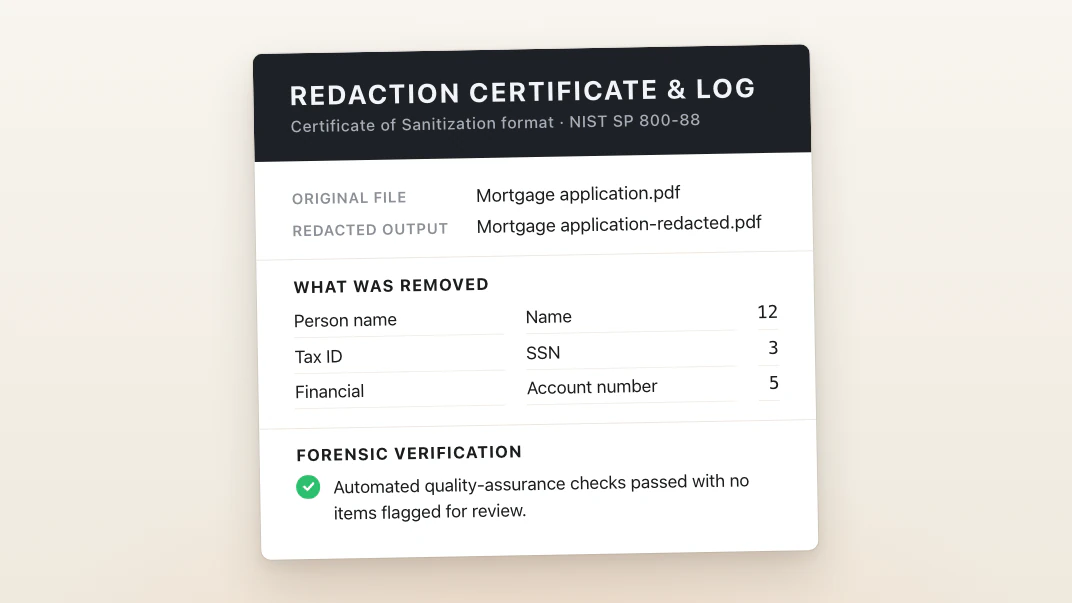
What it detects & removes: the full identifier list under What kinds of information (PII) does Cover find? above, from names and Social Security numbers through non-US national IDs and case numbers.
True removal, not masking:
- Redacted characters are deleted from the page content, not covered, so they can't be selected, copied, searched, or extracted.
- Hidden form-field values, like the ones behind 1099 and W-2 boxes, are wiped, not just masked.
- Document properties are cleared, the file’s metadata is replaced with Cover’s own redaction record (it never holds the redacted text), and embedded digital signatures are dropped.
- Scans are read with OCR, then redacted inside the image itself, so nothing survives underneath.
- Handwritten and drawn signatures by a signature line or label are redacted with their ink; any other signature comes out when you box it in the editor.
- Every file is re-extracted and byte-scanned before it's written. A file that fails verification is rejected rather than saved.
Exemption codes: you can name each redaction's label with its exemption code (labels show in capitals, e.g. (B)(6)). Cover does not assign exemption codes automatically.
Not in scope: native e-discovery load files (Relativity, Concordance).
The two checks every save has to pass before Cover writes the file are explained on the security page, which is also where to report a vulnerability.
What kinds of documents does it handle?
Everyday personal and business paperwork: tax forms and full returns, bank and brokerage statements, medical bills and explanations of benefits, legal letters, insurance correspondence, leases, mortgage and closing packages, and government or immigration forms like the I-485.
There's no page limit. A 200-page tax return or a 400-page closing package redacts the same way a 2-page bill does. A longer document just takes longer, scaling with your Mac.
Mac appText PDFScanned PDFPNGJPEGHEICTIFF
WebText PDF
Scanned pages and images need the Mac app, which reads them with OCR. Image support is newer and still improving.
What’s the difference between the Mac app and Cover for Web?
Both run the same Cover engine on your own device, and neither one uploads your document. The Mac app is the full product. Cover for Web is for the times you are not at your Mac, or not on a Mac at all.
| Mac app | Browser | |
|---|---|---|
| The same in both | ||
| Finds the same personal info, with the same engine | ✓ | ✓ |
| Your PDF never leaves your device | ✓ | ✓ |
| Click a word to redact it, click a redaction to bring it back | ✓ | ✓ |
| Redact one name everywhere in the document at once | ✓ | ✓ |
| Re-reads the saved file and refuses to write a leak | ✓ | ✓ |
| Token mode, and renaming a token to your own label | ✓ | ✓ |
| Drop in a whole folder | ✓ | ✓ |
| Only in the Mac app | ||
| Scans and photographed pages | ✓ | ✗ |
| Password-protected PDFs | ✓ | ✗ |
| Redaction certificate, log, and exemption index | ✓ | ✗ |
| Drag a redacted PDF or pages into an Ai chat | ✓ | Download it first |
| Drag a redacted PDF or pages to your desktop | ✓ | Chrome and Edge |
| Save every redacted PDF to one folder at once | ✓ | ✗ |
| Ask Claude to redact a file for you | ✓ | ✗ |
| Picks up where you left off after you quit | ✓ | ✗ |
| More than one PDF at a time | Up to 8 at once | One at a time |
| Only in the browser | ||
| Windows, Linux, and ChromeOS | ✗ | ✓ |
| Nothing to install | ✗ | ✓ |
One license bought on our website covers both, and registering a browser doesn’t use anything up on your Mac. A Mac App Store subscription covers the Mac app only; here’s how to switch.
The Mac app is faster, and the gap grows with the pile. On one PDF you won’t notice much. On a folder of long documents, use the Mac.
The Mac app also has the desktop around the editor: find in the document, print, Show in Finder, Open Recent, and Shortcuts and Siri.
Will this work on Windows or Linux?
There’s no Windows or Linux app, and there isn’t one planned. We’d rather make it great on one platform than spread thin across three.
You can still redact on those machines. Cover for Web runs the same engine inside a desktop browser, on Windows, Linux, or ChromeOS, and your PDF stays on your own machine there too. What it can’t do is scans and password-protected PDFs, which need the Mac app. The full comparison is above.
How does the 7-day trial work?
The free 7-day trial runs Cover on your real PDFs, end to end including save. Every feature is unlocked and there's no page or document limit, so you can prove the engine works on your documents rather than on a demo file.
Your 7 days are counted from the first PDF you actually redact, so downloading today and getting to it next week costs you nothing. Every PDF you save during the trial carries a watermark. After 7 days you need a license to keep working.
Buying stops the watermark on everything you save from then on. PDFs you already saved keep the watermark that was printed into them, so run those again to get clean copies.
How do I cancel my renewal, start it again, or change my card?
All of it is in one place: open Cover and go to Settings ▸ License, or let this page take you there: open Settings ▸ License for me. What you need is on that pane, and which button you see depends on where you stand.
- Stop your license renewing: Turn off renewal. Your license keeps working to the end of the period you already paid for.
- Start it again after cancelling: Turn on renewal, in the same spot.
- Change the card: Update card, or Manage billing, which opens your billing page and returns you to Cover when you're done.
- A payment that didn't go through: the pane says so and gives you Pay with the amount on it.
- A license that has expired: Renew. That issues a fresh key at checkout, and Cover picks it up.
Both plans, Personal and Business, renew once a year, or once a month with monthly billing.
Bought through the Mac App Store? Subscriptions there are managed by Apple, in System Settings ▸ Apple Account ▸ Subscriptions, not in Cover.
Want your money back instead? See what if it's not right for me.
What if I buy it and it's not right for me?
If you bought on this site, write to us within 14 days of your first payment and we refund it. No form to fill in, and you don't have to justify it. The refund covers your first payment only; renewals are not refundable. The 7-day trial is there so you can check Cover against your own documents first, and the refund window covers the case where you bought without trying it.
To ask, use the message form at the top of this page, or email , and mention the email address you paid with. That address is how we find your purchase; nothing else is needed. If that mailbox is gone, give the purchase date or the last four digits of the card instead. The refund goes back to the card you paid with.
If you bought through the Mac App Store, Apple handles the payment and the refund, so that request goes to Apple under Apple's policy rather than to us.
A license bought here renews once a year, or once a month with monthly billing, and the renewal is automatic. You can cancel any time before a renewal. Cancelling stops the next charge, and the license you already paid for runs to the end of its term. Here's where to do that, along with restarting a renewal or changing your card.
The full text: terms.
Can I buy more than one Business seat in the Mac App Store?
No. The Mac App Store sells Cover Business as a single seat, because subscriptions there cannot be bought in quantity.
On our website you can. Pick your seat count on the Business plan: the menu sits directly above the button, so the total is already right when you reach the checkout.
- Need a quote first? The instant quote is a printable document with your seat count, entity name, and the annual total.
- Need the W-9? Sent on request, made out to whichever entity you name.
- Already bought one seat in the Mac App Store? Tell us and we credit it.
I bought Cover in the Mac App Store. Can I use Cover for Web?
The Mac App Store doesn’t support license keys for Cover for Web.
But we can switch you over. Email with a screenshot of Cover in System Settings ▸ Apple Account ▸ Subscriptions, showing its renewal date. We send you a license key that runs to that same date and covers the Mac app and Cover for Web. Then turn off the renewal on that same screen, so Apple doesn’t charge you again.
What does priority support mean on the Business plan?
Business licences get their own address: . Mail sent there is answered ahead of the general queue.
You do not have to remember it. In Cover, Help ▸ Cover Help opens this page with your licence already attached, and a message sent from the form goes to the same place.
It reaches the same people who answer everything else. The difference is which mail gets read first, not who reads it.
Can you send a W-9, and who is the vendor on the invoice?
Yes. Ask through the message form at the top of this page or email , tell us the entity name to make it out to, and we send the Cover Redact LLC W-9 back to you.
On the receipt itself, payments are processed by Stripe as the merchant of record, so the seller shown on the invoice is Stripe's entity rather than ours. Stripe issues the invoice automatically at checkout and again at each renewal, with the organization name you enter at checkout on it.
For a purchase order or a budget approval, the instant quote gives you a printable document with your seat count, entity name, and the annual total.
How do I enter my license key?
Your key is in the email Your Cover license key, from .
In the Mac app
Open Settings ▸ LicensePaste the key and click Redeem.
In your browser
Open Cover for WebPaste the key and click Redeem.
Can’t find your key? Have us email it again.
My browser isn't registered any more. How do I get it back?
Your key is in the email Your Cover license key, from .
Open Cover for WebPaste the key and click Redeem.
Can’t find your key, or it isn’t accepted? Have us email your current key.
What if I can't find my key?
If Cover is already unlocked on your Mac, nothing is broken. It keeps working. You only need the key again for a new Mac or a fresh install, and an unlocked Cover shows the key itself in Settings ▸ License (open it for me), ready to copy over.
Search your mail for , and check spam. Still gone? Use the Email my key form above.
We only ever send a key to the address on the purchase, so nobody can move a license to a different address by asking.
If that mailbox is gone for good, use the form at the top of this page and we'll verify your purchase.